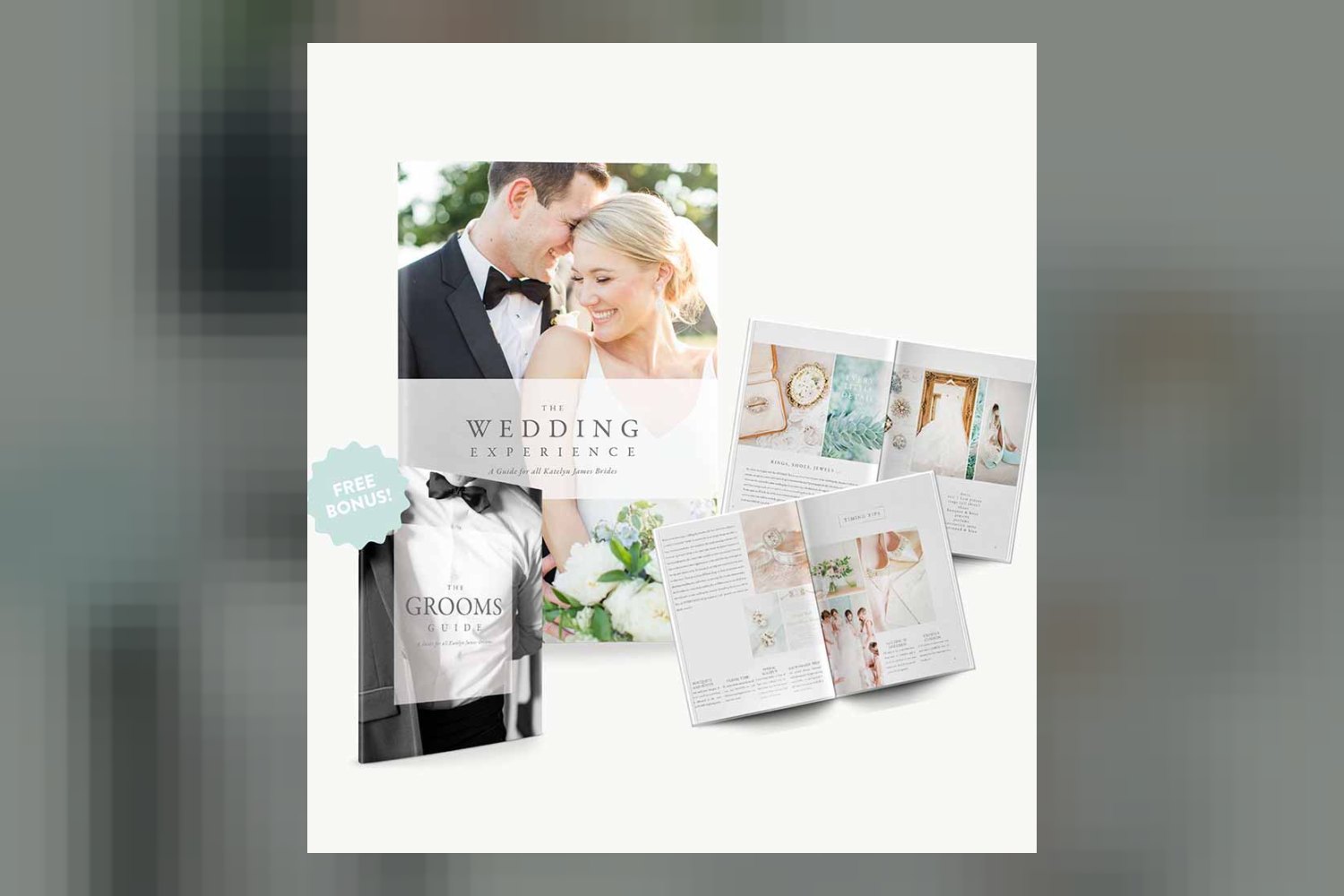
The Bridal Guide by Katelyn James is a customizable Canva template built as a photography business tool. It’s designed primarily for wedding photographers to provide their newly engaged clients with thorough preparation guides. On paper, it’s a substantial package, offering over 90 pages of pre-written text content, but the main catch is that you’re committing to the Canva ecosystem.
What this customizable template covers
This isn’t just a pretty layout; the creator packs it with practical information. We’re talking 90+ customizable template pages, plus seven different cover options to start with. The whole thing is 100% text content, so you’re getting the words already written for you, which the creator says can save over 100 hours of work.
The core of the guide seems to be about preparing couples for their big day. It kicks off with Welcome pages where you can introduce yourself, then moves straight into engagement session prep. This includes practical advice like “Preparing for the engagement session” and “Engagement outfit inspiration.” It even tackles common misconceptions with “Engagement session outfit myths” and helps clients with “Selecting engagement session style,” offering specific recipes like “Romantic outfit style recipe” and “Bright + bold outfit style recipe.”
For the wedding day itself, the template covers a lot of ground. You’ll find “Pre-ceremony timing tips” and a “Sample wedding day timeline” to help manage expectations. There’s a “Bridal details checklist” and a “Family formal sample portrait list,” which are pretty crucial for smooth execution. It even offers “Wedding advice for different seasons” and “Reception planning tips.”
A significant chunk of the content focuses on specific moments and decisions. “The first look explained” is detailed, covering “The benefits of the first look” and even including “Testimonials about the first look.” There’s also a section on “The daddy/daughter first look.” Other specific topics include “Trusting your photographer’s locations,” “Rainy wedding day prep,” “The “controlled” exit explained,” “What makes a veil fly,” and “The unplugged ceremony.”
Beyond the event itself, the guide touches on post-wedding client relations and business aspects. There are pages for “Albums promotional page,” “How to use your online gallery,” and a “Client connection page.” It also includes advice on “High impact planning” and “Avoiding non-professional prints.”
One of the standout details is the bonus “FREE KJ Grooms Guide.” This isn’t just a small add-on; it’s another 25+ customizable template pages, also with 100% text content. It’s structured specifically for the groom, starting with a “Welcome Page for Grooms” and including “Groom’s Details + Checklist.” It explains “What You Can Expect,” introduces the “Second Shooter,” and covers “The Forgotten Detail.” There are even sections like “Including Mom,” “Getting You to the Party,” “5 Tips for Planning the Honeymoon,” and “Being There for Your Bride.” From what the creator publishes, this bonus guide alone seems to tackle nine distinct topics.
Judging by the sheer volume of content and specific topics, this looks like a strong tool for saving time on client education. The creator says it covers over 25 topics for brides and 9 for grooms. That’s a lot of pre-written material you don’t have to generate from scratch.
Who wrote it and what they bring
The creator behind this template is Katelyn James, who is described as an online educator for photographers. Her background is in equipping “purpose-driven entrepreneurs and photographers to turn their story into connection and their gifts into lasting impact.” This suggests she has a solid understanding of both the creative and business sides of photography, particularly how to build client relationships and deliver value.
From that description, it’s clear Katelyn James isn’t just a photographer; she’s an experienced educator. Her goal is to help other photographers achieve lasting impact, which aligns with creating tools that facilitate client communication and education. The detailed content, particularly the extensive advice on client preparation, outfit inspiration, and managing expectations, seems to stem directly from this expertise in guiding both photographers and their clients through important processes.
Who it’s for
This product is made for wedding photographers. Specifically, it’s designed as a business tool for them to use with their newly engaged couples. If you’re a wedding photographer looking to streamline your client onboarding and education process, this guide could fit right into your workflow. It’s built to be given directly to your clients to help them prepare for their engagement session and wedding day.
For example, if you’re constantly answering the same questions about what to wear for engagement photos, or explaining the benefits of a first look, this template provides ready-made answers. It’s for photographers who want to present a polished, professional front and provide thorough information without having to write all of it themselves. The creator states it’s been used by over 5100 photographers, which suggests a broad appeal within the wedding photography community.
What it does not cover
While the Bridal Guide is extensive in its text content, it’s important to understand its limitations. The primary one is its format: this is a Canva Template only. That means you need a Canva account to use and customize it. If you prefer to work in Adobe InDesign, Photoshop, or any other design software, this template won’t be compatible out of the box. You’d have to manually transfer all the text and design elements, which would defeat the purpose of buying a pre-made template designed to save time.
Another point to note, which the creator specifies, is that all digital downloadable products are non-refundable. This means you can’t get a refund after purchasing, so it’s critical to make sure the Canva format works for you before you buy. The template also provides 100% text content, but it doesn’t include photographs. You’ll be responsible for adding your own images to personalize it and make it represent your brand visually. This isn’t necessarily a gap, as it allows for full customization, but it’s something to be aware of if you were expecting a fully illustrated guide.
So, should you get it?
If you’re a wedding photographer and you’re comfortable with Canva, this Bridal Guide looks like a significant time-saver for client education. It offers a huge amount of pre-written, well-organized content that can improve your client experience. However, if you’re not using Canva in your business, or if you prefer to build all your client resources from the ground up, then you should skip it.
Questions people ask
What topics are covered in the Bridal Guide?
The Bridal Guide covers over 25 topics for brides, including engagement session prep, wedding day timing, outfit inspiration, the first look, rainy day prep, album promotion, and client connection.
Is the Bridal Guide customizable?
Yes, it features 90+ customizable template pages and 7 cover options, allowing you to tailor the text content and design to your brand.
What is included in the bonus Grooms Guide?
The bonus KJ Grooms Guide includes 25+ customizable template pages covering 9 topics such as a groom's checklist, what to expect, second shooter introduction, and honeymoon planning tips.
What software is required to use the template?
The template is in Canva format and requires a Canva account for compatibility and customization.
Prefer to buy directly from katelyn james at full price? See the official page.