The Furys Editing Course by Payhip is a thorough program for aspiring and intermediate video editors looking to master advanced functionalities in Adobe After Effects. On paper, it promises deep gets into everything from audio to color grading, but it leaves a few key compatibility and content details unstated, which might be a deciding factor for some.
What the Course Covers in 6 Modules
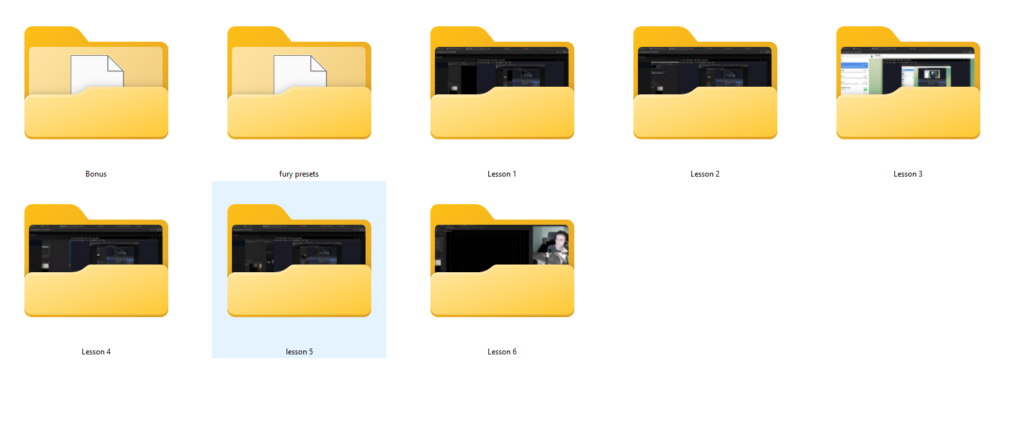
This program is structured into six core modules, an exclusive bonus, and access to a personal library of effect ideas. Judging by the module list, the creator, Furys, aims to take you through a full post-production workflow with a strong emphasis on visual polish and specialized effects.
Here’s how the course breaks down:
- Module 1: The Art of Audio Alchemy – This is where you’d expect to learn how to make your audio sound professional, although the specifics of what “alchemy” entails aren’t published.
- Module 2: Achieving Smooth Video Flow – This module promises to cover smooth transitions and movement. From what the creator publishes, it includes training in Twixtor, time remapping, and advanced graph manipulation. If you’ve struggled with choppy footage or want that buttery-smooth slow motion, this is likely where you’ll find those techniques.
- Module 3: Elevating Visuals with Dynamic Elements – This sounds like the place for effects, overlays, and other elements that make a video pop. It’s about adding flair and visual interest beyond just basic editing.
- Module 4: Preserving and Enhancing Quality – This module focuses on the technical side of keeping your footage looking good. It covers precise rendering settings and three distinct Topaz settings. This is a critical module for anyone who wants their finished product to look as sharp as possible without losing detail. It also includes Handbrake configurations, which are useful for optimizing file sizes and formats.
- Module 5: The Secrets of Professional Color Grading – This is often a make-or-break aspect of video quality. The creator is an experienced editor who shares specific color grades and palettes used in their own work, so you’d expect to get practical, tried-and-true approaches here. This module is probably where Furys’ personal style comes through most strongly.
- Module 6: Exclusive Live Editing Insights – This is a standout detail. It features a closed live stream where Furys edits a project from start to finish. This kind of real-world application can be incredibly valuable, letting you see the creator’s thought process and workflow in action rather than just theoretical lessons.
Beyond the modules, you also get a “Secret Bonus” (the content of which isn’t specified) and access to Furys’ personal library of effect ideas. The effect ideas library sounds like a practical resource for inspiration and quick application in your own projects.
What’s Missing, Thin, or Unclear From the Published Curriculum
While the course outline paints a picture of thorough learning, there are some pretty significant gaps in the published information that you should be aware of before committing. These aren’t necessarily flaws in the course itself, but they’re details the creator doesn’t publish:
- Software Versions: The course doesn’t state specific versions of Adobe After Effects, Twixtor, Topaz, or Handbrake that are required or compatible with the lessons. This is a big one, as After Effects updates frequently, and effects can behave differently across versions.
- Operating System Compatibility: There’s no mention of whether the course is optimized for Windows, macOS, or both. Given the software involved, it’s likely cross-platform, but it’s not stated.
- Lesson Format and Duration: The course is delivered via a dedicated Telegram channel, and lessons are described as “intimate personal lessons.” However, it doesn’t specify the duration or format of these lessons (e.g., video, text, interactive). You don’t know if you’re getting 5-minute quick tips or hour-long deep dives.
- Camera and Log Profile Support: The course doesn’t mention specific camera compatibility or log profile support (like S-Log3, V-Log, etc.). While Module 5 covers color grading, it’s unclear if it addresses footage from various professional cameras or assumes a certain type of input. If you shoot with specific camera profiles, you might need to infer applicability.
- The “Secret Bonus”: Its content is a complete mystery. While bonuses are always nice, knowing what it actually is would help you gauge its value.
These omissions mean you’ll need to make some assumptions or reach out to the creator for clarification if these details are critical to your setup or learning style. For example, if you’re running an older After Effects version, you might wonder if the techniques taught will even apply to you.
What You Need Before You Start
Based on the course’s focus and the tools it covers, you’ll need a few things to get the most out of it:
- Software: You’ll definitely need Adobe After Effects. The course also specifically mentions Twixtor, Topaz, and Handbrake, so you’ll want access to these. It’s not stated whether you need to purchase Twixtor and Topaz separately, but that’s typically the case for third-party plugins. Handbrake is generally free.
- Internet Access: Since the lessons are delivered via a dedicated Telegram channel and include a closed live stream, a reliable internet connection is a must.
- A Discord Account: The course offers personalized support through direct communication with Furys on Discord, so you’ll need to be set up there if you want to take advantage of that.
- Time and Dedication: It’s a “thorough program” for “advanced video editing functionalities,” so expect to put in the time to practice and apply what you learn.
The course creator doesn’t publish any specific hardware requirements (like minimum RAM or GPU for After Effects), but advanced video editing, especially with plugins like Twixtor and Topaz, usually demands a fairly solid computer system.
Who This Course Is For, and the Level It Assumes
The Furys Editing Course is made for a pretty broad audience within the digital media space, specifically targeting aspiring and intermediate skill levels. If you’re a complete beginner who’s never opened After Effects, this might be a bit much to start with, judging by the “advanced functionalities” mention. However, if you’ve got some basic experience and are ready to push your skills, it sounds like a good fit.
The creator lists the following target audiences:
- Aspiring Video Editors: If you’re looking to turn a hobby into a skill set that could land you jobs, the focus on professional color grading and advanced effects could be very appealing.
- Content Creators & YouTubers: For those constantly producing video content, the modules on smooth video flow, dynamic elements, and quality preservation are directly relevant to improving production value and standing out.
- Freelancers: If you’re offering video editing services, the skills taught here could help you command higher rates and deliver more polished work to clients.
- Anyone Passionate About Digital Media: This is a wide net, but essentially, if you love making videos and want to get better at the technical and creative aspects, this course seems designed to scratch that itch.
I think the sweet spot here is someone who has messed around in After Effects a bit, understands the basics, and is now ready to learn the specific techniques that make videos look truly professional, especially those focused on motion, effects, and color.
Who Made It and Why That Matters for What You Will Learn
The creator of this course is Furys, who is described as an experienced editor. This background is important because it suggests the content will be practical and based on real-world application, not just theory.
Furys shares their “personal library of effect ideas and specific color grades and palettes used in their own work.” This isn’t just generic instruction; it’s a peek behind the curtain of a working professional’s actual toolkit and workflow. When you learn color grading from someone who uses specific grades in their own projects, you’re getting tested methods that produce results. Similarly, a personal library of effect ideas can save you a lot of time experimenting by giving you proven starting points.
The “Exclusive Live Editing Insights” module, where Furys edits a project from start to finish, reinforces this. It means you’re not just getting fragmented lessons, but seeing how an experienced editor ties everything together in a complete workflow. This kind of mentorship, even if it’s recorded, can be incredibly beneficial for understanding the flow of a project and troubleshooting in real time.
The personalized support through direct communication with Furys on Discord is another strong point stemming from the creator’s background. It suggests they’re willing to engage with students and provide tailored feedback, which is rare in many online courses.
Who Should Skip It
Despite its potential, the Furys Editing Course isn’t for everyone. You should probably skip this course if:
- You’re a complete beginner to After Effects. While it’s for “aspiring” editors, the focus on “advanced functionalities” means you’ll likely struggle if you don’t even know your way around the interface.
- You need specific software version compatibility. The lack of stated After Effects, Twixtor, Topaz, or Handbrake version requirements is a significant drawback. If you’re running a very old or very new version and need assurance it will work, this course doesn’t provide it. You might find yourself needing to upgrade software or find workarounds.
- You rely on specific camera log profiles. If your workflow heavily depends on footage from cameras like a Blackmagic Pocket 6K Pro or a Panasonic GH5 shooting V-Log, and you need explicit guidance on handling those specific profiles in color grading, the course doesn’t promise that level of detail.
- You prefer downloadable lessons or a structured learning platform outside of Telegram. The delivery via a “dedicated Telegram channel” might not suit everyone’s learning style or preference for offline access. If you prefer to download and keep your lessons, the creator doesn’t publish whether that’s an option.
- You need to know the exact content of bonus materials upfront. If you like to know exactly what you’re getting, the “Secret Bonus” being undisclosed might be a turn-off.
This course feels best suited for someone who already has a decent setup, uses current software versions, and is comfortable with a more flexible learning environment via Telegram.
So, should you get it?
If you’re an aspiring or intermediate editor looking to seriously up your After Effects game, especially in areas like motion, effects, and color grading, and you’re comfortable with the unstated details about software versions and lesson format, the Furys Editing Course by Payhip looks like a solid option. The personalized support and direct insights from an experienced editor are definite strong points. However, if precise compatibility, clear lesson structure, or specific camera workflow support are crucial for you, you’d be wise to seek more information directly from the creator or consider other options.
Questions people ask
What specific After Effects version is needed?
The creator doesn't publish specific versions of Adobe After Effects that are required or compatible with the course.
How long are the lessons in each module?
The creator doesn't specify the duration or format of the lessons. They are described as "intimate personal lessons" delivered via Telegram.
What is included in the 'Secret Bonus'?
The content of the 'Secret Bonus' is not specified by the creator.
Do I need to purchase Twixtor, Topaz, or Handbrake separately?
The course mentions training in Twixtor, Topaz, and Handbrake. While Handbrake is generally free, it's typically the case that Twixtor and Topaz would need to be purchased separately, though the creator doesn't explicitly state this.
Prefer to buy directly from Payhip at full price? See the official page.